Local-First AI Document Translation Tool & Intelligent Assistant

ITransBook is a local-first AI client, deeply integrated with LocalAI models while supporting mainstream cloud AI APIs. 100% local data management: all document translations, AI conversation records, and personal settings remain entirely under your device's control. Absolute privacy, zero compromise on features.

ITransBook Application Interface

Why Choose ITransBook?

A modern translation and AI chat tool, built for efficiency.

Deeply integrated with LocalAI models, while supporting API keys from cloud services such as Google, DeepL, OpenAI, DeepSeek, and Claude.

Translate Anywhere, Anytime

Select text in any application and instantly get multiple translation versions without switching windows.

Precise
Comparison

Compare multiple translation engines side by side to easily grasp the most authentic expressions.

Professional File Translation

Professional translation for your PDF, Word, and other documents with perfect format preservation.

Complete Data Sovereignty

Your data, your sovereignty. All chat records, translation history, translated documents, and API configurations are stored solely on your local device.

Powerful Features

Discover how ITransBook enhances your productivity

Multi-Model AI Chat

Chat with multiple AI models side by side, compare responses instantly, and gain comprehensive insights.

  • Chat with LocalAI, OpenAI, DeepSeek, Claude and more
  • Compare responses across models in real time
  • All conversations are auto-saved locally for private, uninterrupted review
AI Conversation Feature

Multi-Engine Text Translation

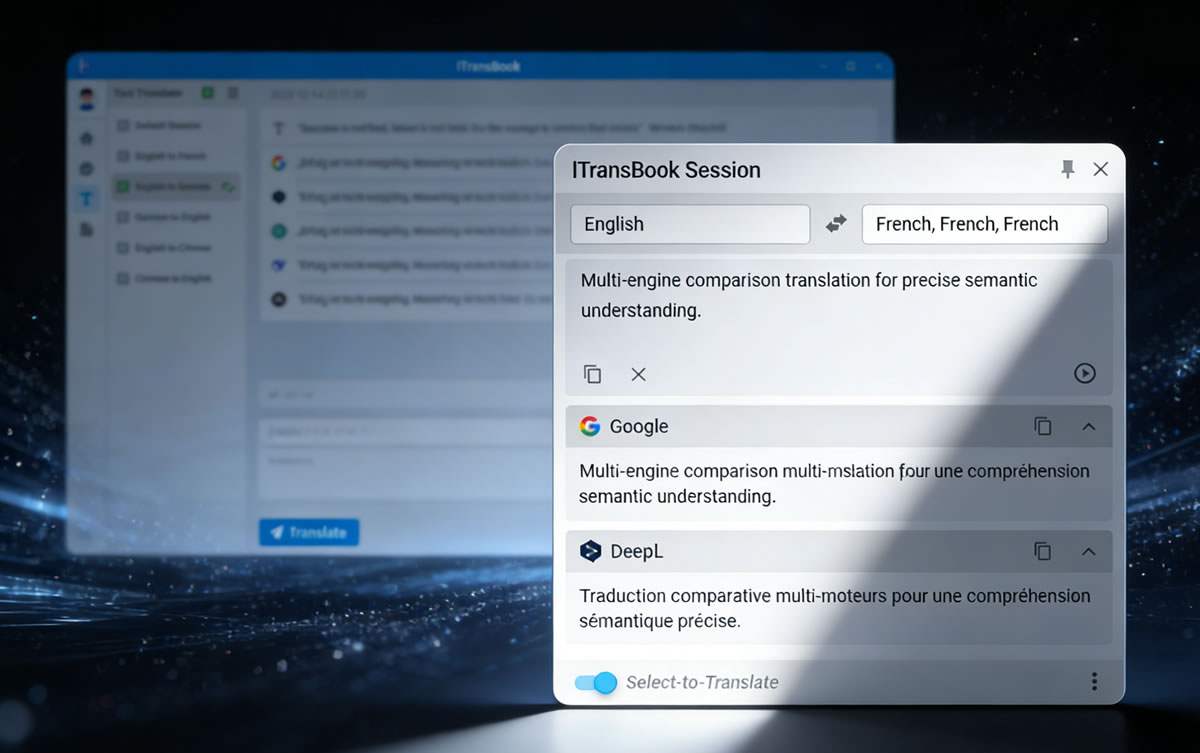
Compare translations from multiple engines side by side. One input, instant results from multiple translation engines.

  • See translations from Google, DeepL, OpenAI, DeepSeek, Claude, LocalAI and more
  • Support cross-language and same-language comparison
  • Accurately grasp semantic differences
Text Translation Feature

Hover Translation

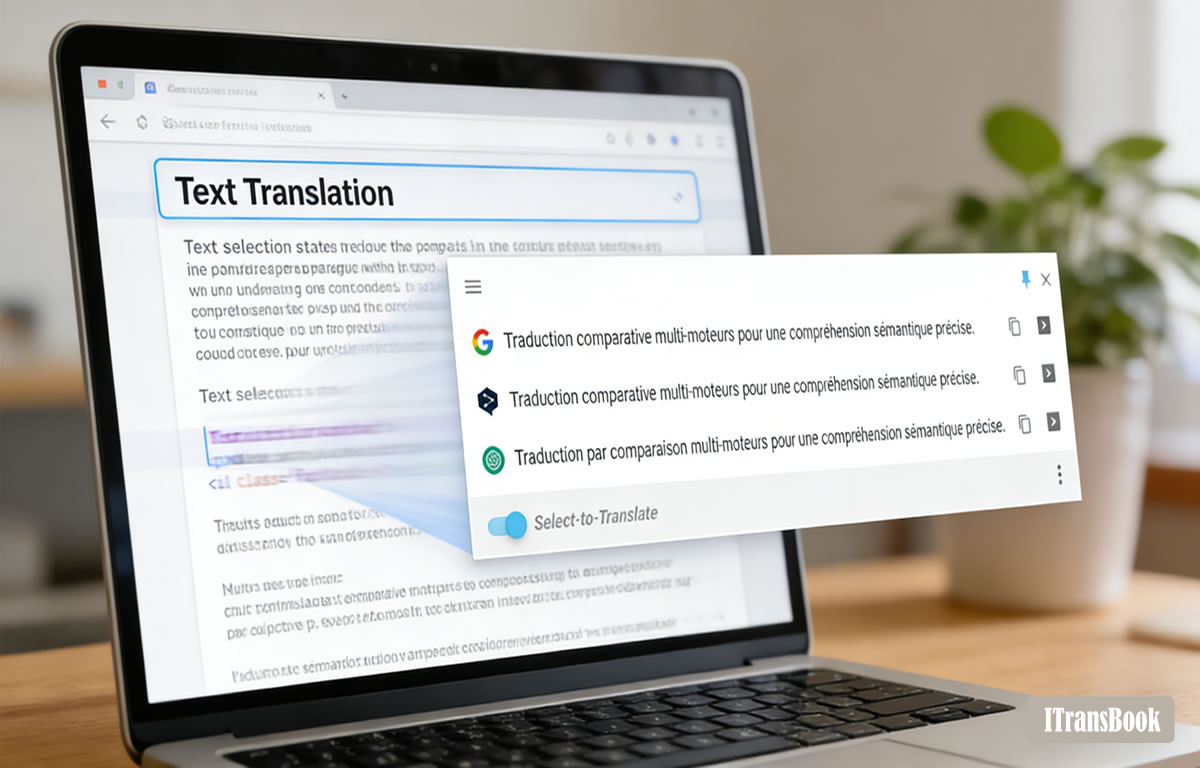
Select text in any program to automatically pop up a translation window displaying results from multiple engines.

  • Translate as you select, no app switching required
  • Multi-result comparison display
  • Support for custom shortcuts
Hover Translation Feature

File Translation

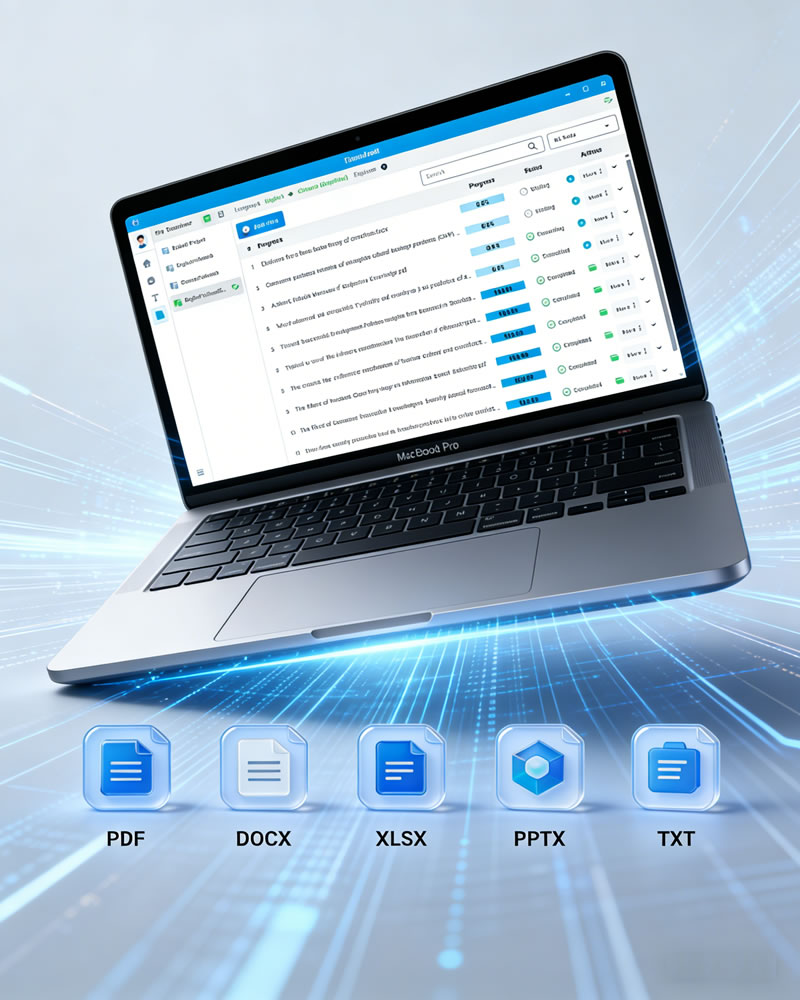
Professional translation for your PDF, Word, and other documents with perfect format preservation. All documents are processed locally without uploads or downloads.

  • Support for PDF, Word, PPT, Excel and more
  • Preserve original document format and layout
  • Translate freely across multiple engines and languages
  • Export side-by-side multilingual documents with one click
  • Multi-task batch processing
  • Local processing, no upload/download required
File Translation Feature

Simple & Transparent Pricing

Choose the plan that fits you best

Choose Your Plan

Free Plan

Use your own API keys, or use local models for free (credit packs available for purchase)
$0 /year
  • AI Chat
  • Text Translation
  • Hover Translation
  • Shortcut Translation
  • File Translation
  • 0 Credits
Use in Application

VIP Plan

Unlock unlimited file translation and advanced features, use your own API keys
$99 /year
  • AI Chat
  • Text Translation
  • Hover Translation
  • Shortcut Translation
  • File Translation
  • 0 Credits
Upgrade in Application

Purchase Credit Packages

No API keys setup needed. Purchase more credits at once for lower unit prices. Credits never expire.

10,000 Credits
$15
30,000 Credits
$30
300,000 Credits
$260
Purchase in Application

Frequently Asked Questions

đź’Ž What are the key differences between Free, VIP, and VIP Plus plans?

Free Plan includes core features such as AI chat, text translation, hover translation, and shortcut translation, but file translation is not available. You will need to use your own API keys or local models (credit packs are also available for cloud API access).

VIP Plan also requires your own API keys or local models (credit packs are also available for cloud API access), and adds unlimited file translation and priority technical support.

VIP Plus Plan includes bonus credits (no API keys required), making it ideal for users who prefer a plug-and-play experience without configuration.

Unless otherwise noted, all plans share the same core features. See the pricing cards for detailed comparison.

🔑 What does "use your own API key" mean? How do I get one?

This means you can enter API keys from third-party translation/AI services like Google, DeepL, OpenAI, DeepSeek, or Claude. ITransBook acts only as a client and does not charge extra fees. You can register and apply for keys on the respective service providers' official websites—some offer free credits. Detailed setup instructions are available in the user manual.

🎫 How do credits work after purchasing a credit pack? Do they expire?

Credits are used to offset character consumption for standard engines (Google, DeepL) or token consumption for AI services (OpenAI, DeepSeek, Claude, etc.).

You can purchase credit packs inside the app. For details, see the Pricing section and credit usage rules within the app. Alternatively, you can receive bonus credits with the VIP Plus plan.

Credits never expire, and you can check your balance anytime. When you use your own API keys, no credits are consumed.

Multiple pack sizes are available with lower unit prices for larger purchases—perfect for users with variable usage needs.

🌍 What languages does ITransBook support? Can it handle less common languages?

ITransBook supports 100+ major global languages, including English, Chinese, Spanish, French, German, Japanese, Korean, Russian, Arabic, Portuguese, and more. Whether you need to translate business documents, academic materials, or everyday conversations, it handles them all with ease. It also supports translation between less common languages, meeting diverse global communication needs.

🤖 Which AI models can I chat with using the "AI Chat" feature? Can I compare them?

ITransBook supports OpenAI, DeepSeek, Claude, and other AI service interfaces by default. You can also add custom AI services in settings. Ask questions to different models simultaneously within the same interface and compare responses side by side—perfect for research, writing, and decision-making support.

🔍 Which applications does the "Hover Translation" feature support?

It supports most mainstream applications: browsers (Chrome/Edge/Safari, etc.), PDF readers (Adobe Acrobat, Preview), Office applications (Word, Excel, PowerPoint), text editors, chat apps, and more. As long as the software uses standard text rendering, you can use hover or selection-based translation without switching windows.

⌨️ Can I use keyboard shortcuts to trigger translation in any application?

Yes. ITransBook provides global keyboard shortcuts (customizable in settings, e.g., Ctrl+Q). Simply select text in any application and press the shortcut to instantly see translation results.

đź“„ What file formats does file translation support? Will the original formatting be preserved?

ITransBook supports common formats including PDF, Word (.docx), PowerPoint (.pptx), Excel (.xlsx), subtitles (.srt), and plain text (.txt), as well as CAT files like Trados (.sdlxliff) and MemoQ (.mqxliff). Using advanced document parsing technology, it preserves original layouts, tables, images, and fonts, delivering high-quality multilingual comparison or translated-only documents.

đź”’ Does the software upload my documents and data to the cloud?

No. Your documents and data are yours alone.

We offer two levels of privacy control:

Absolute Privacy Mode: Use a supported LocalAI model for file translation and AI chat. In this mode, everything from document parsing to AI reasoning happens offline on your device. No data of any kind leaves your machine.

Connected Mode (Cloud API Service): If you choose to use a cloud AI service, only the extracted text is sent via API for processing. Whether you use your own API key or ITransBook's credit-based service, your original document file, per our architecture, never leaves your local device. We act only as a client.

Ready to Boost Your Efficiency?

Download ITransBook now and experience the power of intelligent translation and AI conversation

Download Now